Together
How to work out together when you’re miles apart
Plan a walk or run with a partner in Taqvo, see the schedule in your own time zones, and compare your workouts when you both finish.

A workout with a friend doesn’t have to mean meeting at the same trailhead. With Together, you can make a plan, move in your own neighborhood and come back to a shared recap. It works for partners in different cities, different time zones or simply on different schedules.
What you need before you plan
Both people need Taqvo on iPhone and an account for Together. The person creating the invitation needs Taqvo Pro; the invited partner can join free. Together is built around one partner per session, so start with someone you already want to walk or run with.
Agree on a simple plan before sending the invitation: the activity, an approximate duration and when you each expect to head out. A shared plan can be as small as a walk after work. You don’t need matching routes, distances or paces.
Make your first Together plan
Set up the session in Taqvo, then use that session when you’re ready to move.
Open Together and create an invitation.
Choose a partner in Taqvo, or use an invite link to invite someone. Pick the activity you want to do together.
Set the time and duration.
Review the local-time labels before sending. You can add a note with the plan, such as a relaxed walk or a favorite route you intend to take.
Send the invitation.
Your partner opens it and accepts. Check the confirmed session in Together so you both know which workout you’re joining.
Open the session when you’re ready.
Start your workout from that Together session. Each person records their own activity, in their own place. Finish and save your workout when you’re done.
Come back to the shared recap.
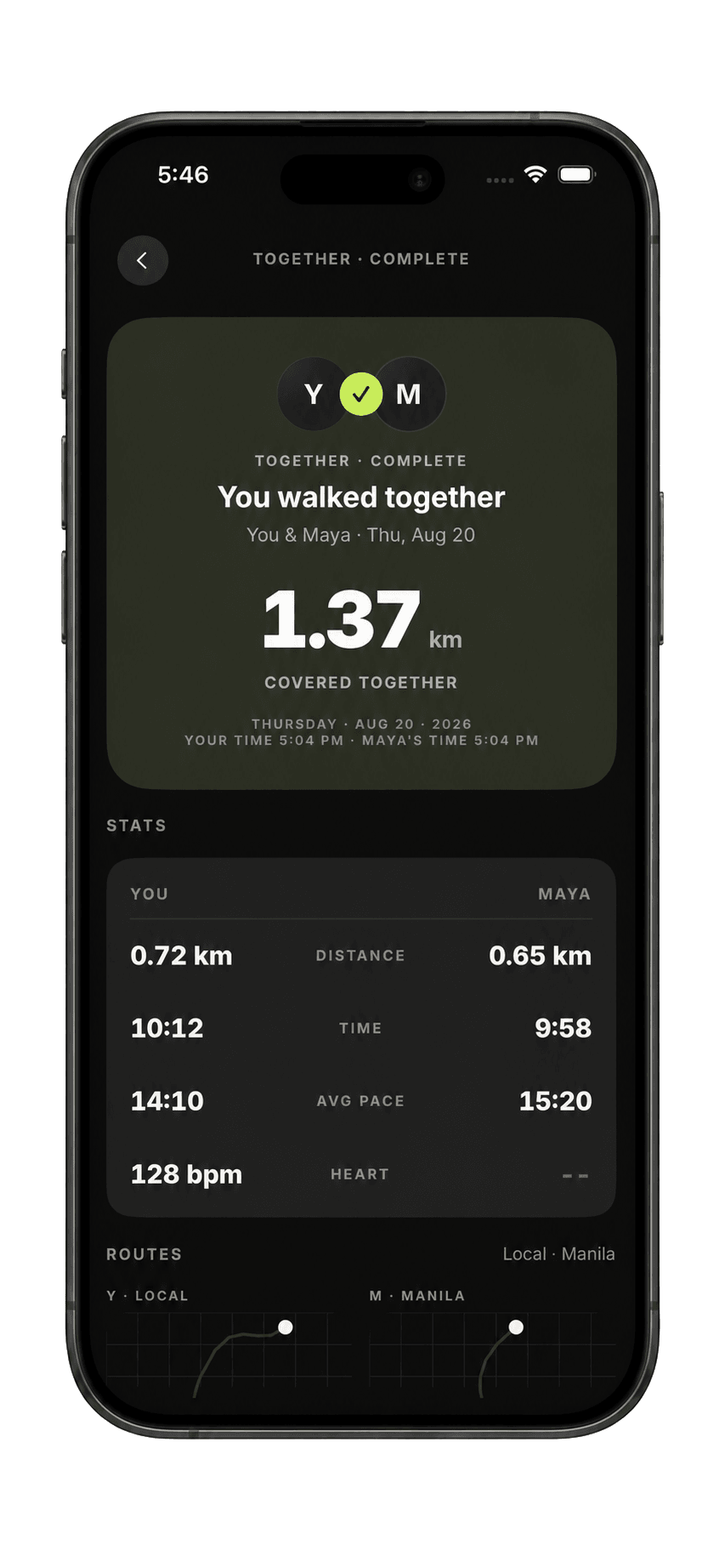
Once both workouts are finished and available, open the completed session to see the results side by side.
Planning across time zones
Use the local times shown in the invitation instead of relying on a message that only says “7 p.m.” Include the day when you discuss a plan, especially if one of you is across the date line. Review the displayed times again if either person changes the schedule.
You don’t have to start at the same moment. Together also supports doing your workouts at different times and comparing them after both people finish. Agree on whether this is a simultaneous workout or a plan to complete when your day allows.
Use the recap to stay connected
The shared recap puts the two workouts together, including available distance, duration, pace and route information. Heart-rate information depends on the data recorded for each workout; a missing reading isn’t a zero.
Different terrain and different goals can produce very different results. Use the recap as a conversation starter: what was the route like, what did you see, and when would you like to go again? Matching numbers isn’t a requirement for a shared workout.
If your partner’s result isn’t there yet
Check that both people opened the same Together session, finished their workouts and have an internet connection so the results can sync. A workout still in progress won’t have its final recap yet.
Together and Beacon serve different purposes. Together connects two people’s workouts. If you want someone who isn’t exercising to follow your live location in a browser, use Beacon instead.
Need a hand? Visit Taqvo support.